
E-commerce apps have become the backbone of digital retail success, where even a single glitch can devastate business performance.
Comprehensive testing serves one critical purpose: delivering a seamless, fast, and secure shopping experience across every device and platform. Your customers expect instant page loads, flawless checkout processes, and bulletproof security regardless of whether they're shopping on iOS, Android, or mobile web browsers.
Traditional manual testing approaches can't keep pace with modern release cycles and complex user journeys. Automation and no-code testing platforms represent the smarter, faster approach for scaling quality assurance in e-commerce environments. These solutions enable teams to catch critical bugs before they reach customers while reducing testing time from weeks to hours.
This comprehensive guide will walk you through building a robust e-commerce app testing strategy that protects revenue, enhances user experience, and scales with your business growth.
Why E-commerce App Testing Is Critical
E-commerce platforms operate in an environment where every interaction influences revenue, customer trust, and long-term loyalty. Understanding why testing is essential helps teams prioritize the areas that directly impact performance, stability, and customer experience.
- Checkout failures directly abandon active sales — Broken payment buttons, form errors, or gateway timeouts cause customers to abandon purchases at the final step. Each checkout failure represents immediate lost revenue that could be prevented through thorough testing.
- Performance delays kill conversions instantly — According to Google, even a one-second delay in mobile load time can reduce conversions by up to 20%. Testing ensures optimal performance that keeps customers engaged through purchase completion.
- Security vulnerabilities destroy business reputation permanently — Untested payment gateways and data handling create entry points for cyberattacks. Security breaches expose customer financial information, triggering legal liability, regulatory fines, and lasting damage to brand trust that takes years to rebuild.
- Cross-device inconsistencies lose mobile shoppers — Mobile commerce continues growing rapidly, but inconsistent experiences across devices and browsers drive away potential buyers. Testing ensures touch interactions, responsive layouts, and mobile checkout flows work flawlessly on every platform customers use.
- Peak traffic crashes waste marketing investments — Untested systems often crash during high-demand periods when revenue potential peaks. These failures waste expensive marketing campaigns and disappoint customers during critical selling moments. A well-documented example is Flipkart’s 2014 Big Billion Day crash, where overwhelming traffic caused checkout failures, app crashes, and warehousing software breakdowns, leaving fewer than 10% of users able to complete purchases.
- Poor user experience increases cart abandonment rates — Confusing navigation, broken search functionality, and unreliable product filters frustrate shoppers who abandon carts before completing purchases. Testing identifies usability issues that directly impact conversion rates and customer satisfaction.
- Unreliable integrations disrupt business operations — Failed connections between inventory systems, shipping providers, and payment processors create operational chaos. Testing ensures all third-party integrations function reliably, preventing order fulfillment delays and customer service escalations.
- Testing delivers measurable ROI through increased conversions — The cost of comprehensive testing is minimal compared to revenue lost from preventable bugs, cart abandonment, and customer churn. Reliable applications convert more browsers into buyers and retain customers for repeat purchases.
These factors show how much of an e-commerce brand’s success depends on consistent reliability across every user touchpoint. A structured testing strategy turns these risks into opportunities to protect revenue and strengthen user confidence, forming the foundation for deeper testing practices.
Key Challenges in Testing E-Commerce Apps
Testing e-commerce applications presents unique obstacles that go far beyond standard software QA. These challenges directly impact revenue, customer retention, and brand reputation.
Device and Browser Fragmentation
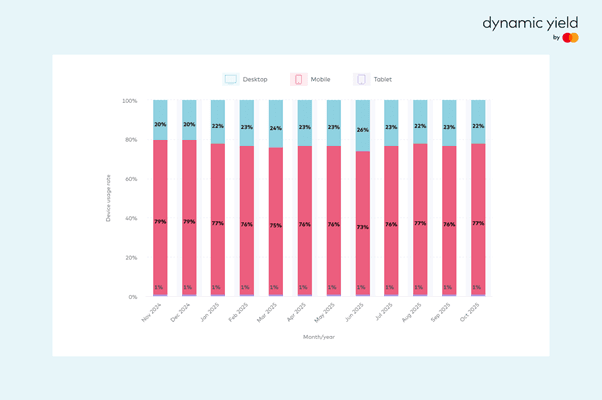
Mobile now accounts for over 70% of e-commerce visits, yet its average conversion rate in the same period (2.96%) still falls slightly behind desktop’s 3.22%. Testing across thousands of devices, OS, and browser combinations becomes resource-intensive when product images fail to load on 3G connections or checkout buttons break on specific screen sizes.
Payment Gateway Dependencies A single payment flow bug can cost hundreds of thousands in monthly revenue. Each payment provider—PayPal, Apple Pay, Klarna, Stripe—requires unique test scenarios and sandbox environments.
Dynamic Data Management Real-time inventory, pricing changes, and promotional updates create moving targets for test automation. Inventory must sync across online stores, physical locations, and curbside pickup, while tests need to handle stockouts, price adjustments, and flash sale scenarios without breaking.
Regression Testing Complexity Frequent feature releases, bug fixes, and seasonal promotions increase the regression testing burden exponentially. Manual testing becomes a bottleneck when every promotional campaign or inventory update risks breaking core shopping flows.
Traffic Surge Simulation Black Friday, flash sales, and viral product launches create unpredictable traffic spikes. Load testing must simulate realistic user behaviors, not just page views, including complex shopping journeys with cart interactions and payment processing.
Compliance and Security Validation GDPR privacy requirements, PCI-DSS payment security, and regional tax calculations add layers of mandatory testing. Global e-commerce requires validation across different regulatory environments simultaneously.
Flaky Test Management Dynamic content, A/B tests, and personalized experiences make automated tests unreliable. Tests that pass in staging may fail in production due to real-world data variations and third-party service dependencies.
These interconnected challenges demand a strategic approach where automation becomes essential for maintaining quality at the speed and scale modern e-commerce demands.
Types of Testing Required for E-commerce Apps
A reliable e-commerce platform depends on comprehensive testing that validates both the user-facing experience and the underlying systems that power each transaction. Each testing type targets specific risks that affect revenue, trust, and long-term customer retention.
Functional and End-to-End Flow Testing
Functional testing verifies the accuracy and stability of every core shopping action. This includes search, product filtering, cart interactions, checkout, payment, order tracking, and account management.
Teams validate complete user journeys across platforms such as Shopify, Magento, WooCommerce, and custom builds. Key scenarios include:
- Browsing through product categories, applying filters, and verifying accurate search results
- Adding and removing items from the cart, updating quantities, and checking recalculated totals
- Applying valid and invalid promo codes
- Completing guest checkout versus account-based checkout
- Handling edge situations such as expired coupons, sold-out items, or removing items during checkout
- Confirming that order confirmation emails reflect accurate product and pricing details
These tests ensure that shoppers encounter a smooth, error-free path from discovery to purchase, reducing friction that commonly leads to abandoned carts.
Performance and Load Testing for High-Traffic Conditions
Performance testing evaluates how the platform behaves as user traffic increases. This is especially important for e-commerce brands that experience predictable surges during events like Black Friday, Cyber Monday, Big Billion Day, or influencer-driven product drops.
Key performance scenarios include:
- Load testing: Validating system behavior under expected daily traffic
- Stress testing: Checking system durability beyond capacity limits
- Spike testing: Simulating sudden surges during flash sales or limited-time drops
- Scalability testing: Ensuring servers, caches, and CDNs scale as transaction volumes grow
Critical workflows such as checkout, search, cart updates, and payment processing must remain responsive even when thousands of users perform actions simultaneously. Performance failures at peak times often translate directly into significant revenue loss.
Security and Compliance Testing
Security testing protects sensitive customer information and ensures that all transactions and stored data remain secure. E-commerce stores handle high-value information, making them frequent targets for attacks.
Important areas include:
- Encryption validation for credentials, payment data, and personal details
- Penetration testing to identify vulnerabilities like SQL injection or cross-site scripting
- Access control and authorization checks to prevent account misuse
- PCI DSS compliance for secure payment handling
- GDPR and regional privacy compliance for data collection and storage
- Testing gateway behavior during interrupted or failed transactions
A secure foundation builds customer trust while reducing exposure to fraud, breaches, and regulatory penalties.
Cross-Platform and Device Compatibility Testing
Compatibility testing ensures that the e-commerce experience remains consistent across browsers, operating systems, and devices. Because shoppers switch frequently between mobile, tablet, and desktop, cross-platform reliability is essential.
Teams validate:
- Layout responsiveness for different screen sizes
- Smooth cart and checkout flows on Android and iOS
- Image loading and catalog rendering across device variations
- Consistent session and cart data between mobile apps and the web
- Browser-level behavior on Chrome, Firefox, Safari, and Edge
A unified experience prevents usability issues that can impact conversions.
API and Integration Testing
E-commerce operations rely on a network of third-party services that must work seamlessly. API testing validates whether these systems communicate reliably and return accurate data.
Key integrations include:
- Payment processors like PayPal, Stripe, and regional gateways
- Shipping providers, including FedEx, DHL, UPS, and local carriers
- Inventory systems for real-time stock updates
- Tax, discount, and pricing engines
- Customer service or support platforms
- Order management and warehouse systems
Scenarios test successful and failed payments, timeouts, shipping rate lookups, and partial or delayed data syncs. Stable integrations prevent disruptions that directly affect customer satisfaction.
Regression and Release Testing
Regression testing ensures that updates do not break existing features. Because e-commerce platforms change frequently—adding promotions, updating UI, enabling new payment options—testing needs to run continuously.
Frequent checks include:
- Login, search, product detail pages, and checkout
- Third-party payment and shipping integrations
- Performance benchmarks after each release
- UI consistency when new elements are added
Automated regression suites help teams deploy upgrades without disrupting critical revenue-generating flows.
Usability and Conversion Testing
Usability testing measures how easily shoppers navigate the platform and identifies friction that prevents conversions. Teams observe how users explore the catalog, manage their carts, and move toward purchase completion.
Key areas include:
- Navigation clarity and ease of product discovery
- A/B tests for checkout layout, button placement, or form design
- Mobile responsiveness and scrolling behavior
- Addressing friction points that increase bounce or abandonment
- Evaluating recovery workflows, such as abandoned cart emails
Improving usability directly enhances conversions and increases customer satisfaction.
Compatibility and Device Testing
Consistency across devices and browsers is essential for modern e-commerce experiences. Compatibility testing verifies performance on:
- Mobile operating systems such as Android and iOS
- Desktop operating systems like Windows and macOS
- Browsers, including Chrome, Firefox, Safari, and Edge
- Various device models and screen resolutions
This testing ensures that all shoppers enjoy a stable and predictable interface regardless of their device.
Localization Testing
Localization testing validates whether e-commerce apps are suitable for international audiences. This includes:
- Correct currency formats and exchange updates
- Accurate language translation and cultural considerations
- Local tax and regulatory compliance
- Multi-region pricing, duties, and delivery rules
Localization errors can undermine trust, create billing inaccuracies, and reduce conversion rates in global markets.
Your e-commerce testing strategy improves significantly when each testing type is addressed thoroughly. Together, these dimensions ensure that the platform performs reliably under real-world conditions, supports seamless shopping experiences, and protects customer data while scaling into new markets.
Types of E-commerce App Testing (Based on Business Model)
Different e-commerce business models introduce unique testing requirements shaped by how they operate, the expectations of their users, and the technical workloads behind each transaction type.
B2C (Business to Consumer)
Examples: Amazon (retail division), Sephora, Nike
Testing priorities focus on user experience optimization and checkout flow refinement to reduce cart abandonment. Performance validation is essential during high-traffic seasons such as Black Friday or holiday sales when customer expectations for speed are highest.
Marketplace
Examples: eBay, Etsy, Walmart Marketplace
Testing emphasizes multi-vendor operations, including seller onboarding, commission calculations, and listing approval flows. Security, fraud checks, and dispute workflows require close attention due to the transaction volume between unfamiliar parties.
Subscription-Based
Examples: Dollar Shave Club, HelloFresh, Spotify (subscription model)
Testing centers on subscription lifecycle logic such as automated renewals, failed payment retries, and plan upgrades or downgrades. Personalization engine accuracy becomes important to maintain engagement and reduce churn.
Digital Goods
Examples: Steam, Audible, Canva
Testing ensures instant delivery of digital files, streaming access, and license validation. DRM enforcement and device authorization checks prevent piracy while preserving a frictionless user experience.
Flash-Sale Stores
Examples: Wish flash deals, Myntra End of Reason Sale events, Shopee flash sales
Testing focuses on scalability under extreme traffic spikes and rapid inventory changes. Load testing simulates the surge when thousands of users attempt to buy discounted items at once.
Cross-Border E-commerce
Examples: AliExpress, Shein, ASOS global store
Testing includes validation across multiple currencies, languages, duties, and tax rules. Compliance checks confirm the correct handling of international payments, customs information, and region-specific shipping constraints.
Your business model establishes which testing areas demand the most investment, shaping how teams prioritize reliability, performance, and customer experience across every release.
Testing Priorities Based on Company Scale and User Load
| Stage | App / User Size | Testing Priorities |
|---|---|---|
| Early-Stage / MVP | Small user base, limited product catalog, low release frequency | Validate core flows like product browsing, cart actions, and checkout. Cover essential devices and browsers. Use smoke tests to confirm stability before each release. Minimal test automation focused on reducing repetitive manual checks. |
| Growth Stage | Regional traffic, expanding catalog, weekly or biweekly releases | Introduce automated regression suites to prevent breakage during faster releases. Add API testing for payments, inventory, and user accounts. Increase device and browser coverage. Begin running performance tests to monitor response times as traffic increases. |
| Enterprise / High-Traffic | Global users, peak-season surges, complex integrations | Implement end-to-end CI/CD automation for constant releases. Run tests in parallel to handle high-volume coverage. Add concurrency testing for cart, checkout, and search flows. Perform security, compliance, and failover validation across environments. Continuous monitoring and quick rollback support become critical. |
Testing maturity grows with scale, and automation becomes essential once release cycles accelerate.
Manual vs Automated Testing for E-commerce Apps
Building an effective e-commerce testing strategy requires understanding the strengths of both manual and automated approaches. Each method adds value in different parts of the testing lifecycle, and combining them strategically ensures faster releases without sacrificing quality.
When Manual Testing Adds the Most Value
Manual testing excels in scenarios where human perception and intuition are essential. It helps teams explore the application in ways automation cannot replicate.
- Product presentation and imagery: Checking image clarity, zoom behavior, variant selectors, and readability of product details that influence buying confidence.
- Navigation and discovery flow: Ensuring categories, filters, sorting options, and search suggestions feel intuitive and return relevant results.
- Real-world shopper behavior: Testing unpredictable actions—opening multiple tabs, switching devices mid-session, or rapidly applying filters—that automation does not naturally model.
- Conversion-critical micro-interactions: Reviewing animations, trust badges, sticky carts, and checkout progress indicators that affect the shopper’s sense of control.
Manual testing is especially valuable early in feature development, helping teams confirm the experience feels clear and trustworthy before investing in automation.
Where Automated Testing Becomes Essential
Automation becomes critical in e-commerce because the pace and scale of online retail far exceed what manual testing can support.
- Constant updates require immediate validation: E-commerce platforms change daily, and automation is the only way to verify core flows fast enough to keep releases moving.
- Large, dynamic catalogs create too many scenarios to test manually: Automated checks handle variations in products, pricing, and inventory with consistency humans can’t match.
- High-traffic events demand proven stability: Automation ensures the platform can handle major spikes before they happen, reducing the risk of costly failures.
As teams release updates more frequently, automated testing becomes the foundation that keeps each release stable and reliable.
No-code automation strengthens this workflow by removing the complexity of scripting. QA teams can create and maintain test coverage visually, making it easier to keep up with fast-changing e-commerce features. This lowers the barrier to automation, reduces dependence on engineering resources, and enables teams to expand coverage quickly while maintaining a clear, maintainable test suite.
Benefits of No-Code Automation for E-commerce App Testing
No-code automation turns e-commerce testing from a slow, resource-heavy process into a scalable advantage that improves speed, accuracy, and team-wide efficiency. Instead of relying on highly technical scripting or specialized developers, teams can build and maintain automated tests visually, allowing quality assurance to keep pace with rapid release cycles.
Dramatic Time Reduction
No-code automation shortens testing timelines significantly by eliminating the need to write or debug scripts. Testers can assemble workflows in minutes using visual components, reducing execution time significantly. Complex checkout paths, multi-step user journeys, and repeated validations run instantly, enabling faster releases and quicker responses to market changes.
Cross-Platform Consistency
With no-code automation, the same test can run across thousands of devices, browsers, and OS combinations without modification. This ensures that cart operations, product browsing, and checkout flows behave consistently for users on any platform. Consistent execution helps prevent fragmented experiences that negatively affect conversions.
Real-Time Bug Detection
No-code platforms provide instant visibility into failures during execution. Critical issues such as broken buttons, failed payments, or invalid price updates surface immediately, reducing the risk of bugs slipping into production. Visual reporting also makes it easier for teams to diagnose issues and understand exactly where user journeys break.
Seamless CI/CD Integration
Modern no-code tools integrate directly into deployment pipelines, allowing automated tests to run with every build or code change. This ensures reliable regression coverage without slowing down development. Teams ship updates confidently, knowing core e-commerce workflows remain stable during high-velocity release cycles.
Enhanced Team Collaboration
Because no-code automation is accessible to both technical and non-technical contributors, it increases cross-functional alignment. Product managers, QA analysts, and business stakeholders can all understand and participate in test creation. Shared visual test assets become living documentation, reducing dependency on specialists and improving transparency across the organization.
No-code automation strengthens e-commerce testing by removing the technical friction that slows down quality assurance. With these advantages established, the next step is understanding how a purpose-built platform elevates these benefits through features designed specifically for retail complexity.
How Sedstart Simplifies E-commerce App Testing
Sedstart enhances e-commerce testing by offering platform-level features that go beyond standard no-code automation tools. These capabilities are designed to strengthen structure, maintainability, and reliability as teams scale their test coverage across fast-changing retail applications.
Visual, Structured Test Design
Sedstart organizes every action into a block-based layout that enforces clarity and consistency. Testers can see the entire workflow, subflows, and building blocks in a single view, making complex e-commerce journeys easy to understand and modify without dealing with underlying code. This includes support for reusable components for common actions such as login, cart updates, address selection, or payment steps. Each block can be parameterized with different data sets, allowing teams to cover multiple scenarios without recreating individual steps. This structure helps maintain consistency across high-volume e-commerce test suites.
Built-In Concurrency Execution
Sedstart can run existing functional tests at high user loads, enabling teams to validate e-commerce behavior during heavy traffic events using the same assets they rely on for regression testing. This removes the need for separate performance scripts or external tooling.
Dynamic Control Flows and Expressions
Complex retail scenarios—such as verifying dynamic pricing, validating coupon logic, or handling conditional inventory—can be modeled through built-in loops, conditions, and expression-based logic. Sedstart supports scenarios that typically require scripting, while preserving a fully no-code experience.
Environment and Data Profile Management
The platform allows teams to define separate environment profiles for QA, staging, and production-like setups. Tests can switch environments without modification, with secret values masked for security. This is especially useful for retailers who run multiple storefronts or region-specific configurations.
Approval Workflows and Version Control
Sedstart includes built-in review mechanisms so changes to tests must be approved before going live. Versioned test assets provide full visibility into updates, helping teams maintain audit-ready QA processes across fast-moving e-commerce releases.
Inbuilt Dashboards for Execution Trends
Sedstart includes dashboards that aggregate runs over time, helping teams identify patterns in test stability or recurring failures. These views simplify ongoing optimization and help QA teams visualize trends across releases.
In fact, Sedstart evaluates failed test runs using structured categories such as “possible bug,” “data issue,” or “script issue.” Each category receives a reliability score, helping teams quickly determine whether a failure indicates a product bug or an expected test adjustment.
Sedstart extends the value of no-code automation by offering capabilities that improve structure, maintainability, and long-term testing reliability. These features enable stronger governance and smoother scaling as applications grow, reinforcing Sedstart’s role in supporting high-quality e-commerce experiences across every release.
Winning E-commerce Starts With Bulletproof Quality
In e-commerce, success hinges on three non-negotiable pillars: speed, security, and flawless execution, and the margin for error continues shrinking.
Automation, particularly no-code testing solutions, has become essential for maintaining consistent quality at scale. Manual testing alone cannot keep pace with frequent releases, complex integrations, and evolving user expectations. No-code platforms empower QA teams to create comprehensive test coverage without technical bottlenecks, ensuring your app delivers reliable performance across all devices and scenarios.
The businesses that thrive are those that treat testing as a competitive advantage, not just a safety net. Deliver bug-free shopping experiences faster.
Book a demo with Sedstart and see how no-code testing transforms e-commerce QA.